


MP3 AutoTagger – Fast, Accurate Tagging for Your Entire Music Library
Clean, Organize, and Fix Your Entire MP3 Library with Ease
€4.99
MP3 AutoTagger automates the tedious process of editing MP3 metadata, allowing you to clean up and standardize your files with just a few clicks. Whether you're managing a few albums or thousands of tracks, this tool brings structure and consistency to your audio library.
Key Features
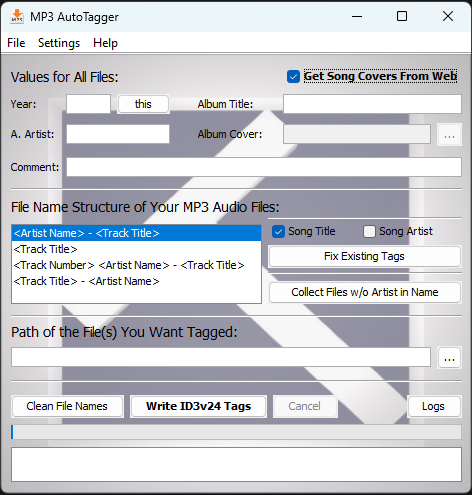
• Automatic writing of clean, standardized ID3v2.4 tags
• Set global values such as Year, Album Title, Album Artist, and Comments
• Choose from multiple file‑name formats (Artist – Title, Title – Artist, etc.)
• Apply tags to individual files or entire folders (including subfolders if enabled)
• Optional web cover retrieval (downloads and embeds 500×500 artwork)
• Batch processing for fast tagging of large collections
• Tools to fix or normalize existing tags (title/artist casing and formatting)
• File‑name cleaner for removing clutter like “(Official Video)”, “Lyrics”, etc.
• Collects files without artist information into a NO_ARTIST folder
• Detailed Logs panel showing all changes and actions
• Safely replaces tags only when a change is detected
What You Can Do with MP3 AutoTagger
Write ID3v2.4 Tags
Choose a file or folder in “Path of the File(s) You Want Tagged”.
Optional enhancements:
• Process files in subfolders
• Derive artist/title automatically using your chosen filename structure
• Write Year, Album, Album Artist, and Comments if provided
• Fetch and embed song covers (may replace existing artwork)Clean File Names
Perfect for YouTube or streaming downloads.
Removes clutter tokens, normalizes separators, optionally capitalizes words, and prevents conflicts by auto‑renaming duplicates.Collect Files Without Artist in the Name
Files missing the separator “ - ” are moved into a structured NO_ARTIST folder for easier organization.Fix Existing Tags
Automatically formats and capitalizes Title and Artist fields.
Only writes changes when the formatted result differs from the original metadata.Logs
View every action performed by the application, including errors and tag updates.
Why MP3 AutoTagger?
Manual tagging is slow, repetitive, and error‑prone.
MP3 AutoTagger handles the heavy lifting—ensuring your collection remains clean, searchable, and consistently formatted across all players and devices.
Perfect for Users Who
• want clean, consistent MP3 metadata
• maintain large or messy music libraries
• prefer automation over manual editing
• rely on organized tags for playlists, DJ sets, or mobile devices
The Result:
A beautifully organized MP3 library—clean tags, consistent filenames, and smooth navigation everywhere you listen.
Requirements
• Requires Java 8 to run
• Recommended download (safe & free): https://adoptium.net/temurin/releases/?version=8
• Java is required so the application can run reliably across Windows, macOS, and Linux